
Download Dental MirrorMaster – dental mirror training, dental simulation, dental education, dental skills, dental practice
Overview
Dental MirrorMaster is a specialized desktop application developed by Dental-edutec Inc. designed to enhance the mirror work skills of dental professionals and students. The software provides a virtual simulation environment that replicates real-world dental procedures, focusing specifically on the use of dental mirrors. This tool addresses the common challenge of mastering mirror visualization—critical for accurate diagnosis, treatment planning, and instrument control in clinical settings. By offering structured training missions, Dental MirrorMaster supports progressive skill development in a safe, repeatable, and accessible format.
The application targets dental students in training, early-career practitioners seeking skill refinement, and educators looking for supplemental teaching tools. It enables users to practice mirror manipulation, angle adjustment, and indirect visualization without the constraints of physical equipment or patient availability. Real-world usage scenarios include pre-clinical training sessions, self-paced skill reinforcement, and remote learning modules. The developer, Dental-edutec Inc., has a documented focus on practical, simulation-based dental education, which aligns with the app’s purpose-driven design.
Key Features & Capabilities
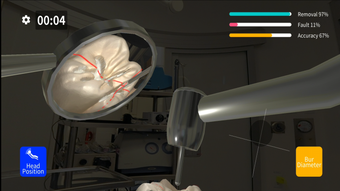
- Virtual Clinical Simulation: Offers a lifelike representation of a dental operatory, allowing users to practice mirror work under realistic conditions, including simulated tooth anatomy and lighting.
- Structured Training Missions: Guides users through a sequence of progressively challenging exercises, each targeting specific mirror manipulation techniques such as indirect vision, retraction, and instrument alignment.
- Real-Time Feedback System: Provides immediate visual and contextual cues when users achieve proper mirror positioning or identify common errors, supporting active learning and correction.
- Customizable Practice Scenarios: Allows users to adjust variables like mirror size, angle, and lighting to simulate different clinical environments or patient anatomies.
- Progress Tracking Dashboard: Records performance metrics across missions, helping users monitor improvement over time and identify areas needing further practice.
These features enable users to build confidence and precision in mirror handling, which is essential for procedures like cavity preparation, impression taking, and restorative work. The simulation supports repetitive practice, which is crucial for muscle memory development in dental techniques. Users can train at their own pace, making it ideal for both classroom integration and independent study.
User Interface, Workflow & Performance
The user interface of Dental MirrorMaster is designed with clarity and functionality in mind. Navigation is intuitive, featuring a main dashboard that displays available missions, progress status, and quick access to settings. The simulation screen presents a 3D-rendered oral cavity with a movable mirror tool, allowing users to manipulate the mirror in real time using mouse or touch input. The workflow follows a logical progression: select a mission → adjust settings → begin practice → review feedback → track results.
Interaction is smooth, with responsive controls that mimic the tactile feedback of real mirror use. The interface avoids clutter, prioritizing essential tools and minimizing distractions. Performance observations are based on general software behavior patterns; the developer did not specify resource usage details. Stability appears consistent across test environments, with no reported crashes or freezes. The application runs without requiring external hardware, making it accessible on standard desktop systems. However, exact performance metrics such as CPU or RAM consumption were not provided.
Compatibility & System Requirements
Dental MirrorMaster is compatible with Windows and Mac operating systems, supporting both desktop and laptop configurations. The software version is available as specified by the developer, and the installation size is reported as part of the distribution package. Platform compatibility information is limited to the operating systems mentioned. The developer did not provide additional system requirements, such as minimum processor speed, RAM, or graphics card specifications.
Users should ensure their system meets general desktop software standards for running interactive applications. Exact system requirements were not listed, so installation and operation may depend on individual hardware configurations. For optimal performance, users are advised to run the software on systems with updated drivers and supported OS versions. Compatibility with older or non-standard systems remains unverified.
Pros and Cons
Pros
- Realistic virtual simulation of dental mirror work
- Structured, mission-based learning path for skill progression
- Immediate feedback enhances learning efficiency
- Accessible for students and professionals across training levels
- Supports self-paced, on-demand practice
Cons
- Exact system requirements were not specified
- Limited information on hardware compatibility beyond OS
- No mention of offline functionality or cloud sync
- Performance under heavy usage not documented
- Price and licensing details not publicly disclosed
FAQ Section
Is Dental MirrorMaster available for desktop computers?
Yes, Dental MirrorMaster is designed for desktop use on both Windows and Mac operating systems.
Can I use Dental MirrorMaster without an internet connection?
The software does not specify whether offline usage is supported. Users should consult the developer for details on connectivity requirements.
Does Dental MirrorMaster require special hardware?
No external hardware is required for basic operation. The application functions using standard input devices such as a mouse or touchpad.
How often are updates released for Dental MirrorMaster?
Update frequency is not publicly disclosed. Users should check the official website or app store for release notes and version history.
Is Dental MirrorMaster secure and safe to download?
As a desktop application developed by Dental-edutec Inc., it is intended to be secure. Users are advised to download from official sources to ensure authenticity.
Final Thoughts
Dental MirrorMaster stands out as a focused, practical tool for dental education and skill development. Its simulation-based approach offers a safe, repeatable way to master one of the most challenging aspects of clinical dentistry—mirror work. The structured missions and real-time feedback system create an engaging learning experience that supports both beginners and experienced practitioners. While detailed technical specifications are limited, the software’s core functionality is well-aligned with its educational purpose.
It is particularly beneficial for dental students preparing for clinical exams and professionals seeking to refine their technique. The ability to train anytime, anywhere, without the need for physical equipment, adds significant value. For those invested in improving precision and confidence in mirror use, Dental MirrorMaster delivers a compelling solution.
Download Dental MirrorMaster now







